Vehicle History Reports
accident, damage, and service information – $3
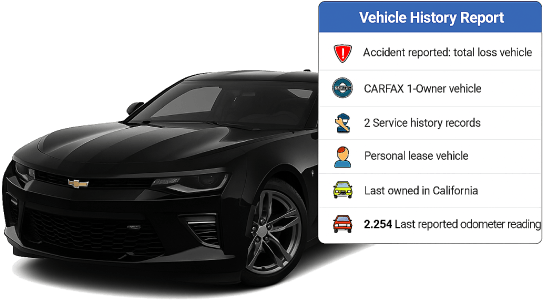
 Check for accidents and damage – allows you to find out if the car has been involved in an accident and how severe the damage was. This is especially important since not all sellers can honestly disclose past accidents.
Mileage fraud protection – The Check VIN Number report shows the history of odometer readings, which helps to identify cases of mileage twisting, which is one of the most common fraud schemes in the used car market.
Legal Clearance Check – shows information about legal issues with the car, such as:
Titles – Information about whether the car has been scrapped, rebuilt after an accident, or declared a total insured loss (totaled).
Liens – Information about possible financial encumbrances (e.g. if the car is pledged to a bank).
Owner Information – shows the number of previous owners as well as their type of use of the vehicle (personal, commercial, rental). This helps you understand how heavily the vehicle has been used, as cars used for rent or as a cab are more likely to be subject to wear and tear.
Service and Inspection History – The report contains information on all recorded maintenance, repairs and completion of mandatory technical inspections. This can indicate how thoroughly the vehicle has been maintained.
Recall Check (recalls) – will show if the vehicle has had any outstanding issues with manufacturer recalls. This is important for safety, as recalls may involve serious defects that require repair.
Preventing the purchase of sunken or reconditioned vehicles – The report helps identify vehicles that may have been damaged by floods, fires, or other natural disasters. You can also find out if restoration work has been done after significant damage.
Transparency in the transaction – buyers can ensure that the history of the car is transparent and avoid unpleasant surprises after the purchase, such as hidden defects or paperwork issues.
The VIN can often be found on the driver’s side door, next to the door latches, and also in the lower left corner of the dashboard in front of the steering wheel. If you own a car, you can find it on the title, registration card, or insurance documents.
Enter the VIN in the search field. After searching the report, you will receive a response about the number of records in the database or the absence of such. If there are records about the history of the car, you will be offered a form with payment and contact e-mail. The report will be sent to the specified e-mail and shown on the screen after payment.
Payment issues can occur due to bank security protocols. Please verify your card details and try again. For immediate resolution, try using an alternative card or secure method (e.g., Apple/Google Pay). If the issue persists, contact your bank or reach out to our support team for assistance.
Our system accepts standard 17-character VINs for vehicles manufactured in 1981 or later. Ensure your VIN contains no special characters for a successful VIN check and report generation.
If you created an account, your purchase link remains active in your dashboard for 90 days. If you lose access to your account, you can quickly restore it using the standard password reset procedure on the login page. For users who purchased the report without registering, the direct report URL link is stored only within the current browsing session. However, the report is also automatically sent to your email address (guaranteed delivery). Therefore, please check your email, or contact our support team immediately if you encounter any issues accessing your delivered file.